


The Architect’s Blueprint for the Agentic Enterprise
Article 4 of 6
The Method: Don’t Automate Chaos—Streamline, Empower, Delight
The $40 Billion Epitaph
There’s a quote often attributed to Peter Drucker (or Bill Gates, depending on who you ask on LinkedIn):
“There is nothing so useless as doing efficiently that which should not be done at all.”
This is the epitaph for 95% of failed AI projects.
Let me put that number in context: MIT recently analyzed 300+ AI deployments and surveyed 153 senior leaders. The findings are brutal:
80% of organizations explore AI tools
60% evaluate enterprise solutions
20% launch pilots
Only 5% reach production with measurable impact
The difference between the 5% who succeed and the 95% who fail isn’t model intelligence. It isn’t compute budget. It isn’t having the “smartest” data scientists.
It’s methodology.
Most enterprise AI pilots fail not because the model wasn’t smart enough, but because the team tried to automate a bad process. If you take a bureaucratic, 12-step approval workflow and put an AI agent on top of it, you don’t get digital transformation. You get Automated Bureaucracy. You just get the bad result faster.
I’ve watched this pattern destroy millions in AI investment. A major financial services firm spent $8 million building an agent to automate their loan approval process. The agent was brilliant—state-of-the-art NLP, sophisticated risk modeling, seamless integration.
It failed spectacularly.
Why? Because the underlying process required 47 data points, 11 approval stages, and manual verification of documents that were already digitally available in other systems. The agent just made the terrible process 20% faster. Nobody celebrated spending $8 million to go from “painfully slow” to “slightly less painfully slow.”
In our last article, we built the team (The Hub and Spoke, GPO-GSO pairs). Today, we’re giving them the playbook. It’s a simple, three-step methodology that works for everything from HR hiring to supply chain logistics:
Streamline. Empower. Delight.
This is the exact framework Oracle used to save 20,000 manager hours annually. This is how Seven West Media moved from 0 to 8 production agents in 9 months. This is what separates the 5% from the 95%.
Let’s break it down.
Step 1: Streamline (The “Anti-Automation” Phase)
Before you write a single line of code or prompt a single model, you must ruthlessly simplify the process.
The Rule: Do not automate chaos.
The Oracle Expense Report Story
Let’s go back to one of Oracle’s internal transformations that exemplifies this perfectly.
The Problem: Expense reporting was slow, painful, and universally hated. Employees complained. Managers complained. Finance complained.
The Trap: The lazy solution would be to build an agent that nags managers: “Hey, you have 5 expense reports pending approval. Please click here to review.”
This is what 95% of organizations would do. It’s “automation” in the sense that a robot is now sending the nag emails instead of a human. But it doesn’t solve anything.
The Fix (Streamline): Oracle’s Finance GPO asked a different question: “Why do we have 5 layers of approval for a $20 lunch receipt?”
The answer? Because that’s how it’s always been done. There was no good reason.
So they made bold changes:
Rationalized expense categories to simplify the employee experience (fewer dropdown options, clearer guidance)
Amended policies to accelerate the process—for example, eliminated the requirement to itemize hotel bills
Reduced employee information collection requirements by automating the classification of key corporate card transactions
Cut approval layers from 5 to 2 for most expense types
Only after the process was stripped to its bones did they look at AI.
The Result: They streamlined the process so much that 50% of corporate credit card transactions didn’t even require employee submission—they were automatically classified and approved.
The Diagnostic Question
Here’s the question your GPO must ask before deploying any AI:
“If we had zero technology, how would we fix this?”
Not “How can AI make this faster?” but “Why are we doing it this way at all?”
Example patterns to eliminate:
Redundant approvals (if the budget owner approved, why does the department head need to review?)
Unnecessary data collection (why ask employees to enter data that already exists in another system?)
Manual verification of digital information (why print a PDF, sign it, scan it, and email it?)
Work-around workflows (if people routinely bypass the “official” process, your process is broken)
The Seven West Media Example
Seven West Media partnered with Databricks to launch the “Seven AI Factory.” In 9 months, they got 8 agents into full production.
That’s a 16% success rate—3x better than the industry average of 5%.
How? They followed the Streamline principle religiously. Before building an AI solution to predict audience viewing habits, they first:
Consolidated fragmented data sources into a unified platform
Standardized metrics definitions across teams
Eliminated manual data collection processes
Automated baseline reporting (no AI required)
Only then did they layer AI-driven predictions on top.
The CTO’s observation: “It just gives [staff] a way of getting their hands on metrics or insights a lot quicker than what they ever had previously or couldn’t do previously, which gives them more time to act.”
That’s the goal: Give people time to make decisions, not time to compile data.
Action Item for Your GPO
Before your next AI kickoff meeting, run this exercise:
Map the current process (every step, every handoff, every approval)
Highlight steps that:
Exist only because “that’s how we’ve always done it”
Could be eliminated by policy change (no tech needed)
Involve manual data entry of information that exists elsewhere
Create bottlenecks with no measurable value
Eliminate or redesign those steps first
Only then bring in the GSO to discuss AI
If you skip Step 1-3 and jump to Step 4, you’re automating chaos.
Step 2: Empower (Give the Agent “Hands”)
This is where we move from Chat to Work.
Most corporate “Copilots” are just sophisticated search engines. You ask, “How do I update my tax withholding?” and it pastes a link to a PDF.
That isn’t helpful. That’s just a librarian with a better search algorithm.
From Read-Only to Read-Write
To be Agentic, the system needs Hands (API Access).
Level 1 (Chat): “Here is the policy on tax withholding. It’s a 12-page PDF. Good luck.”
Level 2 (Agentic): “I see you want to change your withholding to 2 exemptions. I’ve drafted the form in Workday. Click ‘Confirm’ to execute the change.”
This shift—from retrieving information to executing transactions—is where the ROI lives.
The Oracle Empowerment Story
Oracle’s expense submission transformation exemplifies this perfectly:
Old Way (Chat):
Employee logs into ERP portal
Navigates through multiple screens
Manually categorizes each expense
Uploads receipt images
Submits for approval
Manager logs in, reviews, approves
New Way (Empowered Agent):
Employee takes photo of receipt with phone
Texts photo to bot
Bot extracts data (date, merchant, amount)
Bot matches to corporate card transaction
Bot categorizes expense automatically
Bot submits for approval (or auto-approves if within policy)
Manager receives simple “Approve/Reject” notification
The Key: The agent doesn’t just tell the employee how to submit an expense. It does the submission.
Result: 50% of corporate card transactions fully automated. Employees don’t submit anything. The system handles it end-to-end.
The Architecture: Brain, Hands, Shield
Here’s how you build this safely:
User Intent → Brain (LLM) → Hands (Deterministic Code) → System of Record
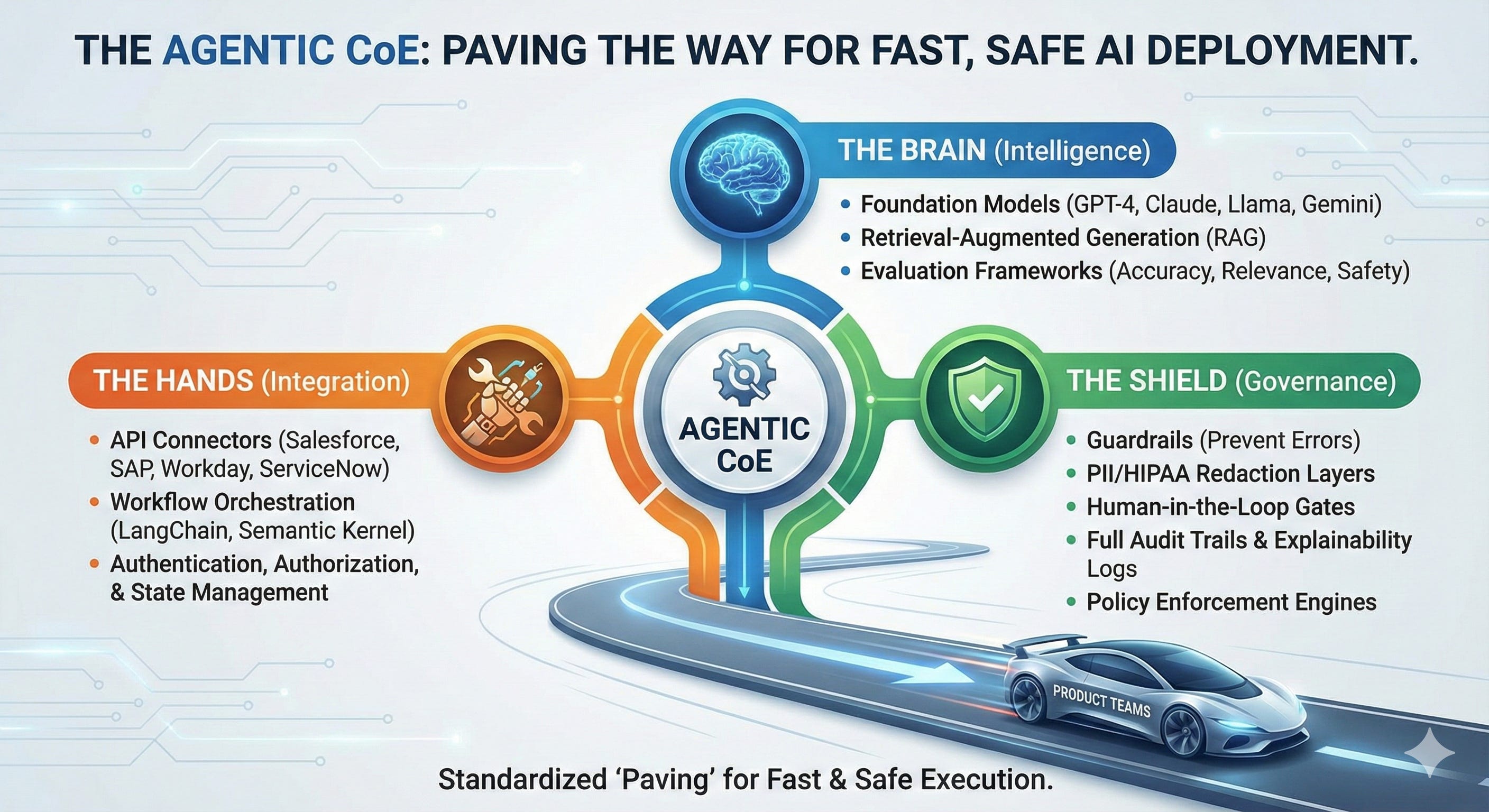
Example: “Change my tax withholding to 2”
Brain (GPT-4):
Parses intent: User wants to modify W-4 form
Extracts parameters: New exemptions = 2
Generates request: update_tax_withholding(employee_id, exemptions=2)
Hands (Python function with API access):
Authenticates user (least privilege: can only modify own record)
Validates input (exemptions must be 0-10, integer)
Calls Workday API: PATCH /employees/{id}/tax_config
Confirms transaction success
Shield (Governance layer):
Logs transaction (who, what, when, why)
Checks confidence threshold (if <90%, route to human)
Enforces rate limiting (max 5 changes per day)
Generates audit trail for compliance
Critical Security Principle: The LLM never touches the database directly. It requests a tool, and the deterministic code executes the action. This prevents hallucination from corrupting data.
Code Beats Poetry. Every. Single. Time.
The Empowerment Checklist
For each agent, verify:
✅ Can it execute the action, or only recommend it?
Bad: “You should update Salesforce.” (recommendation)
Good: “I’ve updated Salesforce. Here’s the confirmation number.” (execution)
✅ Does it have appropriate API access?
Check: Does the agent have least-privilege credentials for the specific systems it needs?
Check: Can it read and write, not just read?
✅ Is there a human approval gate for high-stakes decisions?
Example: Auto-approve expenses <$500, require human approval >$500
Example: Auto-schedule meetings, but escalate conflicts to human
✅ Can it handle errors gracefully?
If the API call fails, does it retry? Escalate to human? Provide clear error message?
If you answered “no” to any of these, your agent is still a chatbot pretending to be agentic.
Step 3: Delight (Trust is the Currency)
If the user doesn’t trust the agent, they won’t use it. And if they don’t use it, you have no ROI.
“Delight” sounds fluffy, but in AI, it’s a hard metric. The difference between 20% adoption and 80% adoption often comes down to micro-interactions that build or destroy trust.
The Trust Equation
User trust in AI agents depends on three factors:
1. Reliability
Does it work consistently?
Does it handle edge cases gracefully?
When it fails, does it fail safely?
2. Transparency
Does the user understand what the agent did and why?
Can they see the decision trail?
Does the agent explain its confidence level?
3. Empathy
Does it feel like it’s working with the user or at them?
Does it acknowledge mistakes?
Does it provide escape hatches when things go wrong?
The Anti-Pattern: The Frustrating Agent
Here’s an example of an agent that destroys trust:
User: “Approve this expense report.”
Bad Agent: “I’m sorry, I cannot do that.”
User: “Why not?”
Bad Agent: “An error occurred. Please try again later.”
This is worse than having no agent at all. It creates work (the user still has to manually approve) and frustration (they wasted time asking).
The Delight Pattern: The Helpful Agent
Here’s the same interaction, redesigned:
User: “Approve this expense report.”
Good Agent: “I’ve reviewed the expense report for $2,450. I can’t auto-approve it because it exceeds your $2,000 approval limit. I’ve escalated it to your manager, Sarah Chen, who will receive a notification within 5 minutes. Would you like me to add a note explaining the urgency?”
User: “Yes, it’s for the client proposal deadline.”
Good Agent: “Done. I’ve added: ‘Client proposal deadline, approval needed by COB today.’ Sarah has been notified via email and Slack. I’ll follow up if you don’t hear back in 2 hours.”
Same outcome (human approval required), but the experience is fundamentally different. The agent:
Explained why it couldn’t complete the action (transparency)
Took the next step automatically (escalated to manager)
Offered to help further (add explanatory note)
Set expectations (timeline for follow-up)
The Oracle@Oracle Win: Conversational Delight
When Oracle rolled out their new procurement and expense flows, they didn’t just make them faster—they made them conversational.
Instead of logging into a clunky ERP portal, an employee could:
Text a photo of a receipt to a bot
Receive immediate confirmation: “Got it. $45 for client lunch. I’ve matched it to your corporate card transaction ending in 4521. Submitted for approval.”
Get proactive updates: “Your expense report was approved by Manager X. Reimbursement will appear in your paycheck on Friday.”
That isn’t just efficient. It feels like magic.
And because it felt like magic, adoption skyrocketed. Employees stopped complaining about expense reporting. Some even said it was “easy” (unheard of for corporate finance processes).
The Metrics That Matter
Oracle and Seven West Media both tracked these user experience metrics:
Adoption Metrics:
% of eligible users actively using the agent (Target: >70% within 90 days)
Daily/weekly active users
Feature utilization rate
Satisfaction Metrics:
User satisfaction score (CSAT) - Target: >4.5/5
Net Promoter Score (NPS) - Target: >70
Return rate (do users come back, or try once and abandon?)
Trust Metrics:
Task success rate (% of users who accomplish their goal)
First-time success rate (did it work the first time?)
Abandonment rate (% who start but don’t finish)
Override frequency (how often do users reject the agent’s recommendation?)
Seven West Media’s Numbers:
After 9 months with their AI Factory:
8 agents in full production (16% success rate vs. 5% industry average)
94% accuracy rate in audience predictions
40% growth in daily active users on their 7plus platform
$16 million in incremental ad revenue from AI-powered re-engagement campaigns
The Key: They measured user experience as rigorously as technical performance.
The Delight Checklist
For every agent, ask:
✅ Does it explain decisions transparently?
“I approved this because it’s under policy limit of $500.”
NOT: “Approved.” (no explanation)
✅ Does it handle failures gracefully?
“I can’t process this receipt because the image is blurry. Would you like to retake the photo or upload a PDF instead?”
NOT: “Error 403: Invalid input.”
✅ Does it set clear expectations?
“Your request will be reviewed by a human specialist within 2 business hours.”
NOT: “Your request has been submitted.” (no timeline)
✅ Does it offer proactive help?
“I noticed you submit expenses monthly. Would you like me to send a reminder on the 25th of each month?”
NOT: Just waiting for user to remember
✅ Does it learn from feedback?
“You’ve rejected my category suggestions 3 times. Should I stop auto-categorizing for this merchant?”
NOT: Repeating the same mistake endlessly
The 95% Trap: Which Step Do Most Organizations Skip?
Based on MIT’s research and my own experience with dozens of deployments, here’s where the 95% fail:
60% fail at Step 1 (Streamline)
They automate the existing broken process without simplification
They assume “AI will figure it out” without redesigning workflows
They deploy agents that perpetuate inefficiency at machine speed
30% fail at Step 2 (Empower)
They build chatbots that can’t execute actions (stuck at read-only)
They lack API integration to critical systems
They underestimate the engineering effort required for reliable automation
10% fail at Step 3 (Delight)
They build technically correct solutions that users hate
They ignore user experience feedback (”it works, why aren’t they using it?”)
They don’t measure adoption, satisfaction, or trust
The 5% who succeed do all three:
Simplify first (eliminate unnecessary complexity)
Integrate deeply (give agents real system access)
Design for humans (build trust through experience)
The Architect’s Checklist
For every use case your CoE proposes, ask these three questions:
1. Streamline: Have we removed every unnecessary step before adding AI?
❌ Red Flag: “We’re automating the approval process exactly as it exists today.”
✅ Green Flag: “We eliminated 70% of approval steps, and now we’re automating what remains.”
2. Empower: Can the agent actually do the work, or is it just talking about it?
❌ Red Flag: “The agent tells users what to do next.”
✅ Green Flag: “The agent executes the next step automatically and confirms completion.”
3. Delight: Would you personally want to use this tool, or would you prefer the old way?
❌ Red Flag: “Users keep asking for the old manual process back.”
✅ Green Flag: “Users are asking ‘Can we use the agent for X workflow too?’”
If the answer to any of these is “No,” send it back to the drawing board.
What Comes Next
You’ve got the framework (3 dimensions). You’ve got the team (Hub & Spoke, GPO-GSO pairs). You’ve got the method (Streamline, Empower, Delight).
Now we need to learn from the failures.
In Article 5, we’re going to look at the car crashes—the spectacular, expensive, sometimes hilarious failures that teach us more than any success story ever could.
We’ll analyze:
Air Canada’s lying chatbot that invented a refund policy and cost them in court
Samsung’s data sieve where employees leaked confidential code to ChatGPT
The $1 Chevy Tahoe where a dealership’s unconstrained chatbot made unauthorized deals
Each failure teaches a critical lesson about guardrails, grounding, and governance. Because the difference between “useful agent” and “corporate liability” is often just one missing safeguard.
That’s what we’re tackling next.
Here is the Agentic Blueprint
For easy access, feel free to select
Article 1: The 3-dimensional maturity model (Brain, Hands, Shield)
Article 2: The 5 levels of autonomy (Copilot → Autopilot)
Article 3: The team structure (Hub-and-Spoke, GPO-GSO pairs)
Article 4: The methodology (Streamline, Empower, Delight)
Article 5: The anti-patterns (avoid the Four Disasters)